You can download the app from the Google Play Store (opens in a new tab) or Direct APK Download (opens in a new tab).
Introduction
AnythingLLM Mobile is a real AI assistant that lives in your pocket, not in the cloud. See, hear, search, and remember - powered by models running right on your phone.
It is currently only available for Android. The app is available in the Google Play Store and can be downloaded directly from the AnythingLLM Mobile website (opens in a new tab). If you are a de-Googler or don't have access to the play store
you can sideload the .apk directly via downloading it from our mobile landing page (opens in a new tab)
AnythingLLM Mobile is free and open source software. The source code is available on GitHub (opens in a new tab).
What is AnythingLLM Mobile?
AnythingLLM Mobile brings the local-first ethos of AnythingLLM (opens in a new tab) to your phone. We believe intelligence should be private, instant, and available on every device you own, with all the context you want it to have.
Mobile devices, even the most cutting edge, are limited in the models they can run before they overheat or run out of memory, so AnythingLLM Mobile takes a hybrid approach: your phone is the agent harness, and the model can live wherever makes sense for you.
- Run a small language model (SLM) right on the device, fully offline.
- Pair over your network with AnythingLLM Desktop, LM Studio, Ollama, or llama.cpp.
- Connect to the cloud provider you already use.
Wherever the tokens come from, your tools, documents, and chats stay on your device. Just want private, offline chat? Download an SLM and you're done. Want more, like long-horizon research, document generation, or recurring background jobs? Point the app at on-premise compute or the cloud and keep going. Your data never leaves your phone unless you decide it should.
Features
Models
- On-device LLM inference - Run GGUF models locally via llama.cpp. Works with no signal at all. Supports both reasoning and non-reasoning models.
- On-device vision - Attach images and chat about them using multimodal models, fully offline.
- Hugging Face model browser - Discover, download, and manage GGUF models without leaving the app. A fit badge tells you whether a model will run well on your phone.
- Tuned to your device - Context windows and capabilities scale to your phone's RAM, and prompts are laid out to preserve the KV cache between turns so on-device replies start fast.
- Change models on the fly - Swap between on-device models and remote providers at any time.
- Connect to AnythingLLM - Pair with your Desktop or self-hosted instance for full workspace and document chat. See Syncing with AnythingLLM Desktop or Cloud.
- Bring your own provider - Ollama, LM Studio, OpenRouter, Anthropic, OpenAI, or any OpenAI-compatible API, with automatic model discovery and prompt caching where the provider supports it.
Everywhere on your phone
- Ask with AnythingLLM - Select text in any app and AnythingLLM appears in the selection toolbar. Polish, shorten, fix grammar or make it formal, or summarize, pull key points, explain and research what you're reading - with the model you chose, not the OEM assistant. Edits are ephemeral; summaries are saved as threads. You can switch this off under Settings › Special tools.
- Share to AnythingLLM - Send photos, documents and links from any app straight into a chat. Links are scraped, documents are parsed, and the empty thread suggests what to do with them.
- Scheduled jobs - Ask for a recurring task (a morning news digest, a weekly check-in) and the assistant runs it on schedule, even with the app closed, and notifies you when done.
- Lock-screen notifications - Get notified when a reply finishes while your phone is locked.
Chat
- Voice input - Tap the mic and talk. Speech-to-text uses your phone's native recognition and keeps up with natural pauses.
- Memory - A manually managed memory system, globally or per workspace, that recalls what you told it when relevant.
- Built-in agent tools - Web search, web page reading, summarization, location, time, calendar reading and creation, drafting emails or texts, creating files and scheduling jobs. Smart tool selection picks the right one so small models keep a workable context window.
- On-device RAG - Attach PDFs, Word, Excel, PowerPoint, text and more. Embedding, vector database, and reranking all run fully on device, with citations.
- Create documents - Generate Word, PDF, PowerPoint and text files from a conversation.
- Chat export - PDF (images included), Markdown, JSON, or plain text.
- Workspaces and threads - Organize your chats the same way you do in AnythingLLM Desktop.
- Familiar UX - Chain-of-thought display, citations, fork and retry, auto-named threads, and more.
- Privacy-first - Your data, documents, and chats stay on your device.
Syncing with AnythingLLM Desktop or Cloud
Note: For AnythingLLM Desktop you need to enable "Enable Network Discovery" in the Settings > "Admin" > "General" page so that the Desktop app is available on the LAN via 0.0.0.0 bindings.
AnythingLLM Mobile, while functional and complete standalone, is designed to also be a companion to AnythingLLM Desktop and AnythingLLM Cloud. You can sync your chats, workspaces, and threads with AnythingLLM Desktop or AnythingLLM Cloud/Self-hosted instances to leverage the full power of AnythingLLM from your phone, including your instance's documents, custom agent tools, and MCP servers.
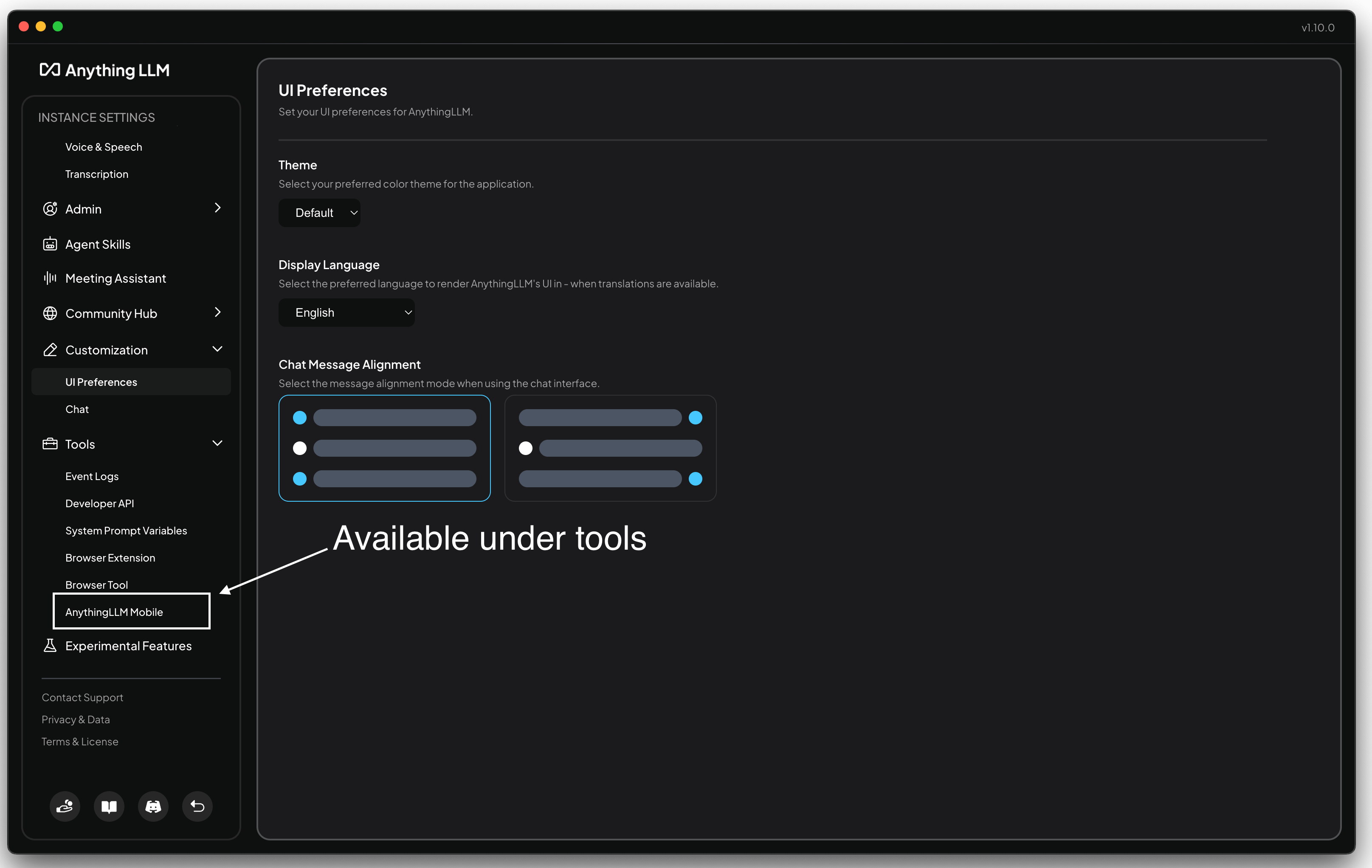
To do this, click on the AnythingLLM Mobile text on the sidebar settings under Tools. From here you can scan the QR code with the AnythingLLM Mobile app to connect the two apps.
Support & Feedback
If you have any general questions, please join the #anythingllm-mobile channel in the AnythingLLM Discord (opens in a new tab) and we'll help you out.
Bugs and feature requests can be filed as issues on GitHub (opens in a new tab). All other feedback should be reported via the AnythingLLM Discord (opens in a new tab) in the #anythingllm-mobile channel.
Common Questions
iOS support?
AnythingLLM Mobile is Android-only today. iOS support is planned, but there is no release date yet.
Can I download any model I want?
Yes. The built-in Hugging Face model browser lets you search for and download any GGUF model. Each model shows a fit badge indicating whether it is likely to run well on your phone's hardware. Very large models may still be too slow or run out of memory on mobile devices.
Does the app work offline?
Yes. With an on-device model downloaded, chat, vision, document RAG, and memory all work with no network connection. Tools that need the internet, like web search, and remote providers require a connection.
How does the on-device RAG work?
AnythingLLM Mobile runs a small embedding model, a local vector database, and a reranker on your device to provide RAG capabilities with citations. Your documents are never uploaded anywhere.
How can I add my own agent tools?
Currently, to use custom agent tools, MCPs or otherwise, you should use the sync feature with AnythingLLM Desktop or AnythingLLM Cloud. Customization of agent tools on mobile standalone is not yet supported.