Notable Improvements
This release is focused on improving the agent experience and adding new features to the agent system as well as moving towards a more passive, personal, and hybrid AI experience.
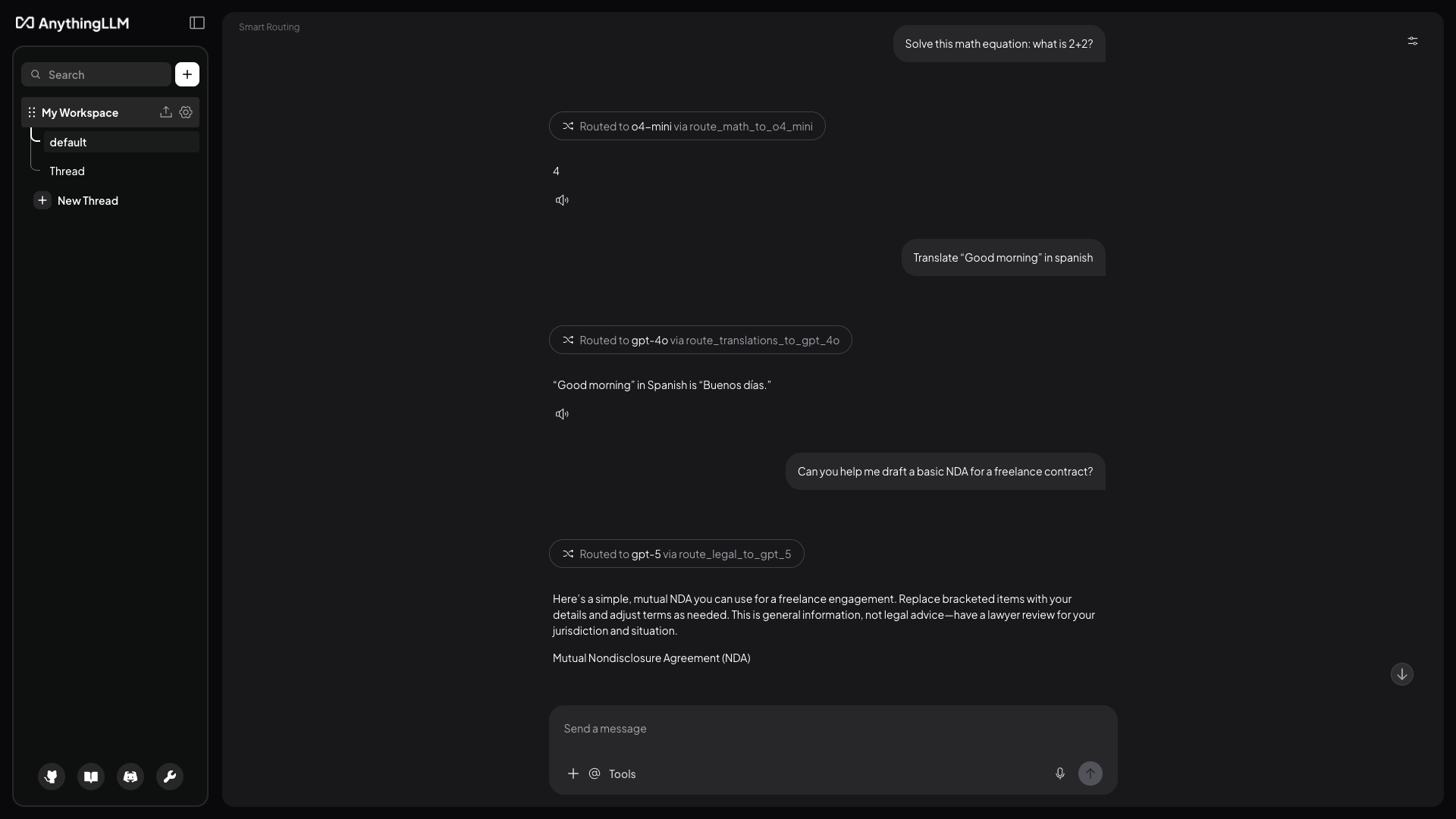
Model Router: The World's First Hybrid AI Experience
No other platform offers what AnythingLLM is shipping today.
The Model Router is the first-ever user-defined intelligent routing system that seamlessly blends local and cloud AI into a single, unified experience that is entirely under your control. Until now, you had to choose: run everything locally, or send everything to the cloud. That tradeoff is over.
With Model Router, you define the rules. Every message you send is automatically analyzed and routed to the perfect model for that specific task, whether that's a lightweight local model for quick questions, a reasoning model for complex math, or your most powerful cloud model for nuanced legal analysis. All from the same chat. All invisible to the user. All defined by you.
What makes this groundbreaking:
- True hybrid AI. Mix and match local models (Ollama, LM Studio, etc.) with cloud providers (OpenAI, Anthropic, Google) in a single conversation. No manual switching. No compromises.
- You're in complete control. Create calculated rules that trigger on keywords, token counts, time of day, or image attachments instantaneously. Or use LLM-classified rules that understand intent in plain English.
- Save money without sacrificing quality. Route simple queries to cheap or local models. Reserve expensive API calls for the messages that actually need them.
- Intelligent caching. Our advanced sticky routing system keeps you on the same model during a conversation thread, so you're not bouncing between models on every message.
This is, we believe, a fundamental shift in how AI assistants work. For the first time, you get the privacy of local models, the power of cloud models, and the intelligence to know when to use each. And it's 100% open source.
Learn how to set up your first router →
Scheduled Jobs: Your AI That Works While You Don't
What if your AI assistant could work for you in the background, automatically, on a schedule you define, without you lifting a finger?
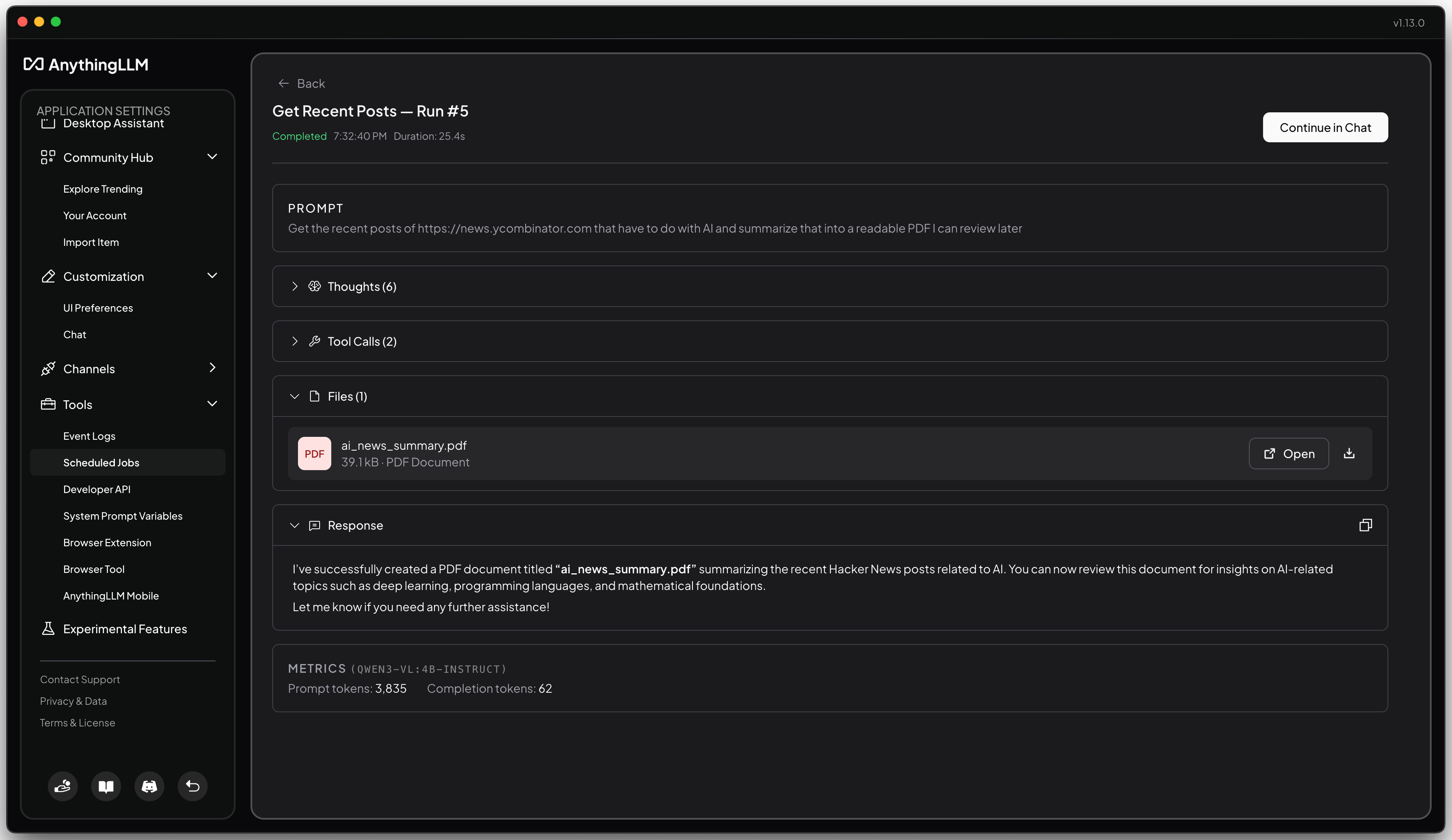
Scheduled Jobs turns AnythingLLM into an always-on AI workforce. Create recurring tasks that run themselves: morning briefings, weekly reports, data monitoring, research digests. Anything you'd normally ask an agent to do, but automated and hands-free.
Why this changes everything:
- Set it and forget it. Define a prompt, pick your tools, choose a schedule, and walk away. Your agent runs exactly when you need it: every morning at 8 AM, every Monday at noon, every hour on the hour.
- No technical knowledge required. Our visual Cron Builder lets you schedule jobs with simple dropdowns. No cryptic cron syntax, no command line, no code. Just point and click.
- Full agent power, fully automated. Scheduled jobs have access to the same tools as your regular chats: web search, document analysis, custom skills, MCP integrations, and more. If an agent can do it in a conversation, it can do it on a schedule.
- Complete run history. Every execution is logged with the agent's full reasoning, tool calls, generated files, and final response. Review past runs anytime, or continue where the agent left off in a new thread.
- Push notifications. Get alerted the moment a job finishes, even when AnythingLLM is in the background. Click to jump straight to results.
This is yet another capability no other local-first AI app offers. Enterprise tools charge thousands for this kind of automation. Cloud-only platforms require you to trust your data to third parties. AnythingLLM gives you scheduled AI agents that run entirely on your machine, with your data, under your control.
Wake up to a summary of overnight emails. Get weekly progress reports written automatically. Monitor websites for changes. The possibilities are endless, and it all happens while you focus on what matters.
Learn how to create your first scheduled job →
Automatic Memories & Personalization
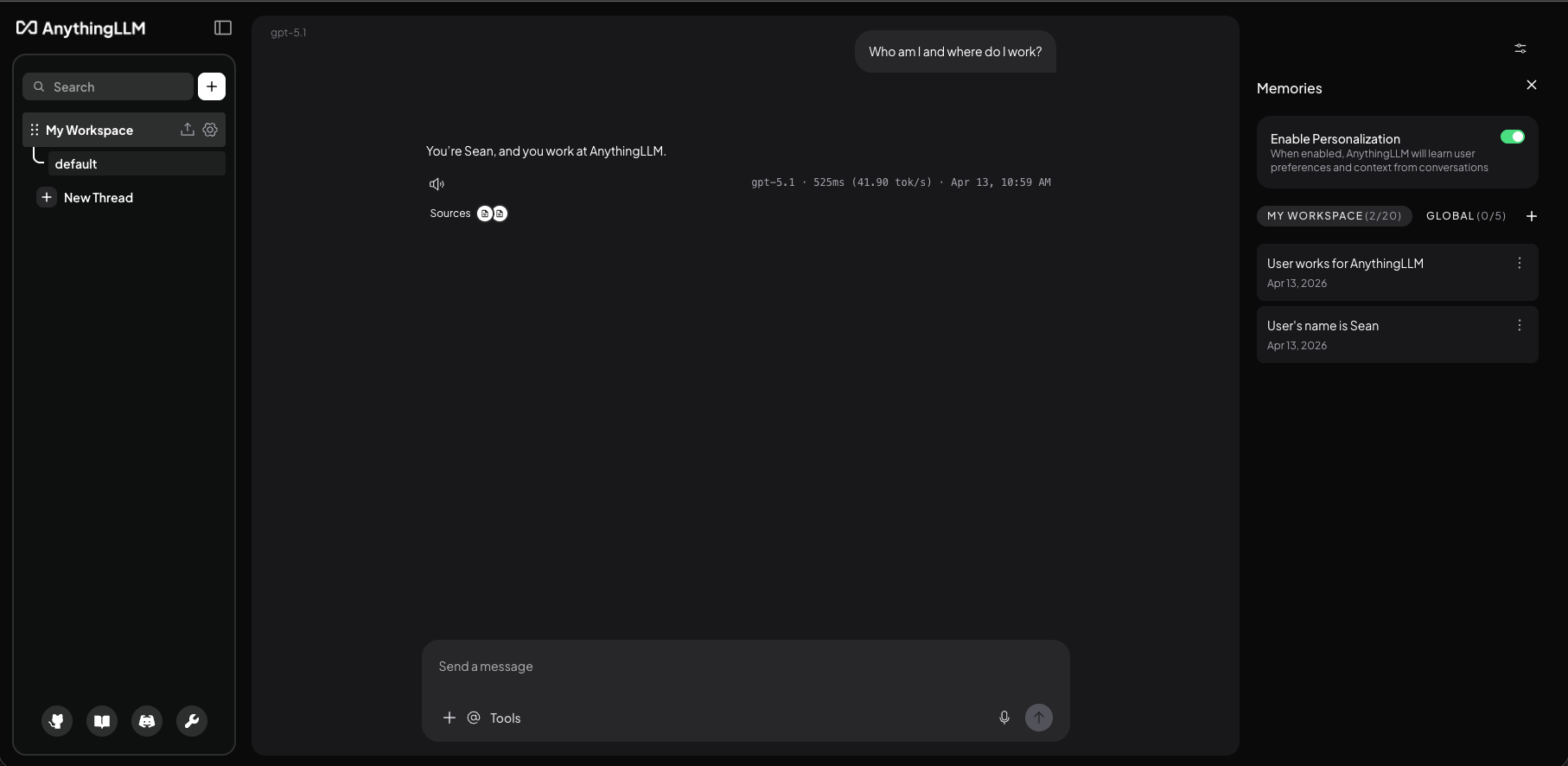
AnythingLLM now supports automatic memory extraction and personalization so your AI assistant can remember what you've talked about and use that knowledge to personalize its responses.
AnythingLLM runs a background job to extract memories from your chats and store them in a memory bank. This memory bank is then used to personalize the responses of your AI assistant - you have full control over what is remembered and how it is used you can even add custom memories manually to the memory bank.
There are two types of memories:
- Workspace memories: These are memories that are specific to the current workspace (like what you are working on, projects-specific information, etc.)
- Global memories: These are memories that are specific to the entire AnythingLLM instance (like your name, preferences, etc.)
Memories are injected into the system prompt of your AI assistant so it can use them to personalize its responses and are a welcome addition to your AI assistant's knowledge base.
Learn how to enable and manage memories →
Agent Surveys (special tool)
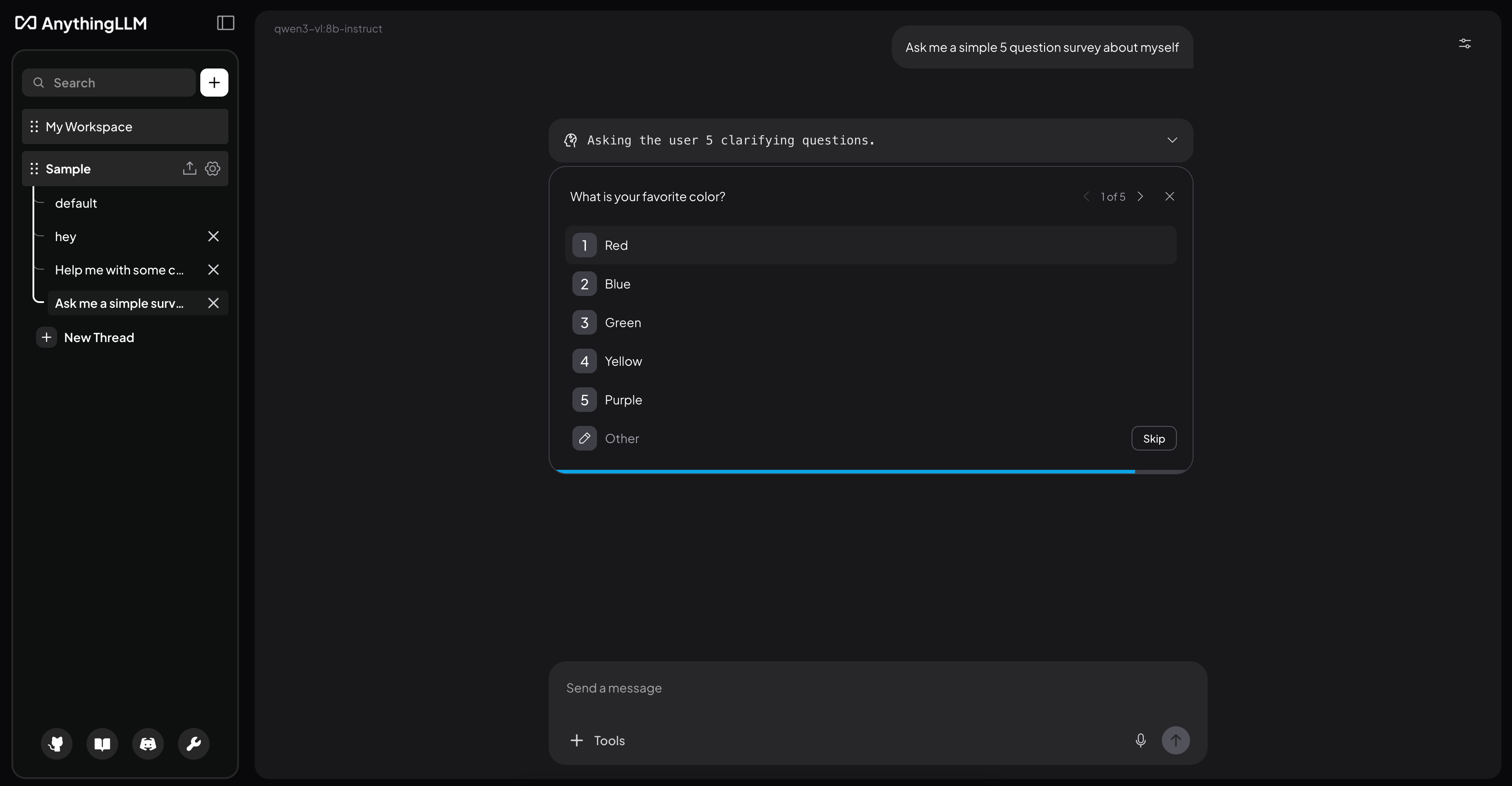
Agent Surveys is a special tool that allows your AI assistant to ask clarifying questions before proceeding. This is useful when you are working with a complex task and the agent needs more information to proceed.
This is off by default and must be enabled in the agent settings. Answers to the questions are saved alongside the chat message so the agent can use them in future turns.
Learn how to enable and manage agent surveys →
Other Improvements
-
Better tools menu so you can now see and manage all your tools directly from the chat window.
-
Baidu web search support
-
Improvements in error handling and reporting for several providers.
-
Fix Deepseek v4 reinject thoughts bug causing errors in chat
-
UI tooltips improvements and UX
-
Support for Reasoning from LMStudio/Lemonade
-
We have renamed "Auto" to "Agent" in the chat window so it is more clear (works the same way)
-
MiniMax support
-
Pull generated documents from API
-
Security improvements
Bug Fixes
- Fixed issue where you would need to
/resetthe chat twice to clear the chat history. - Fixed issue where TTS would include markdown tags in the spoken text.
- Fixed issue where "Auto speak" would not work on new message
- Community Hub clipping/layout on narrow screens improved
- Font fallback for Cyrillic characters
- Gemini Parallel tool calling bug fixed, also better Gemini error reporting
Pinned Download Links
Revision 1.13.0:
| Operating System | Architecture | Download |
|---|---|---|
| Mac | x64 | Download (opens in a new tab) |
| Mac | ARM64 | Download (opens in a new tab) |
| Windows | x64 | Download (opens in a new tab) |
| Windows | ARM64 | Download (opens in a new tab) |
| Linux | x64 | Download (opens in a new tab) |
| Linux | ARM64 | Download (opens in a new tab) |